 BetaLobby
You found 12 testers, ran your closed test for 14 days straight, clicked Apply for production, and a few days later this landed in your inbox: More testing required to access Google Play production.
I got this email more than once while applying for production access myself.
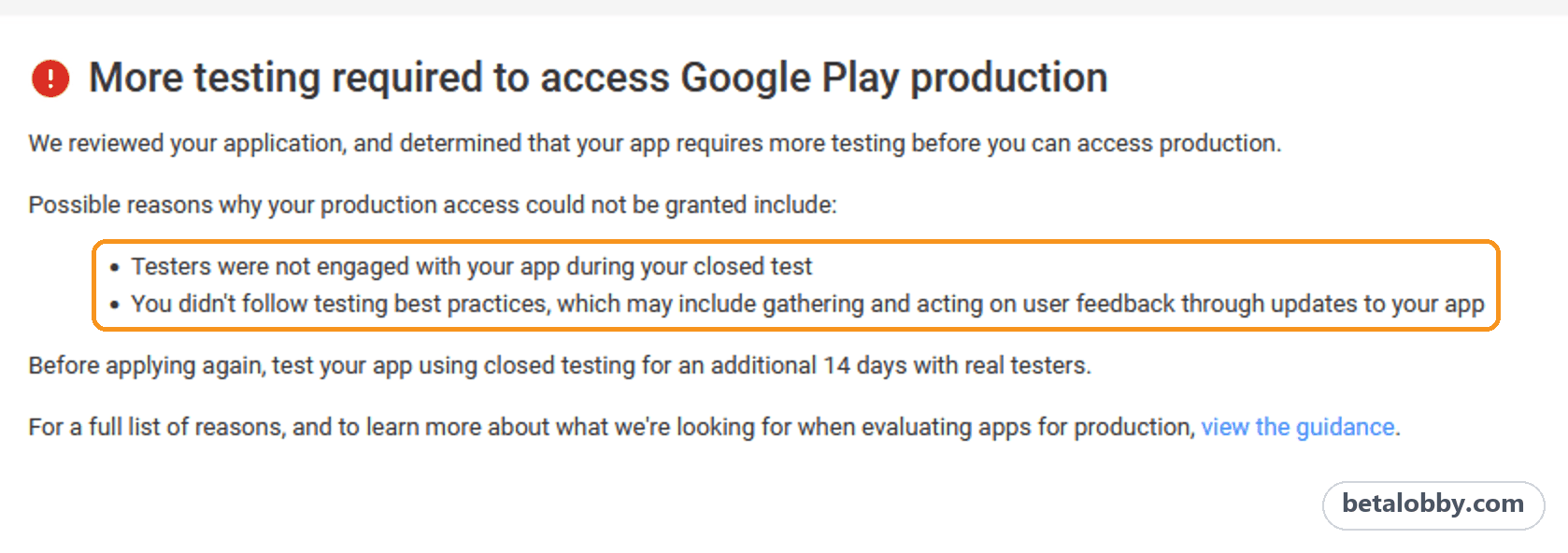
The email gives only two reasons, and both are vague:
- Testers were not engaged with your app during your closed test
- You didn't follow testing best practices, which may include gathering and acting on user feedback through updates to your app
Then it asks you to "test your app using closed testing for an additional 14 days with real testers" before applying again.
Google doesn't publish exactly how it reviews applications, so what follows isn't an official answer. It's what I learned from being rejected and finally approved: the 5 things most worth checking.
- Installed audience
- Daily Active Users (DAU)
- App quality and updates during the test
- How you fill in the application questions
- Whether your testers are real
Go through them before you start the next 14 days.
1Installed audience: opted in is not the same as installed
The most common misunderstanding about closed testing: the number of testers who opted in, the number who installed your app, and the number who open it each day are three different numbers. Play Console showing 12 opted-in testers doesn't mean 12 people installed your app. There are several more assumptions like this, which I covered in 5 things new developers get wrong about closed testing.
To see real installs, open Play Console and click Statistics in the left menu. By default it shows Installed audience for the last 28 days.
One catch: the chart is split by Country / region, with 5 rows selected by default (all countries plus your top 4), so you see several lines at once. Open that filter, keep only All countries / regions, untick the rest, and click Apply. The single line left is your total installed audience.
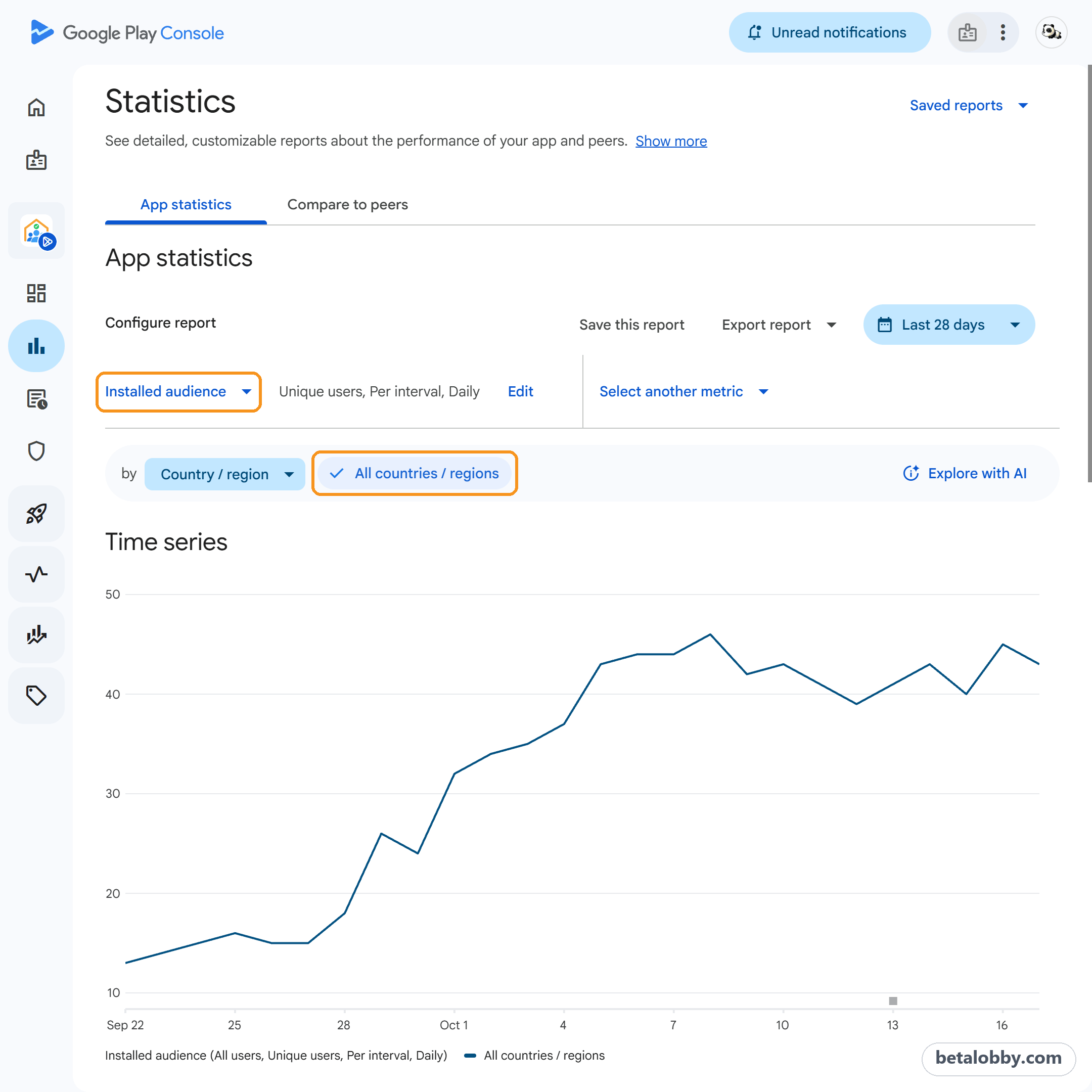
Play Console defines it as the number of users who have your app installed on at least one device that has been turned on in the last 30 days. It counts people, not installs, so one person installing on two phones counts once.
I also noticed something in my own tests: when several devices on the same network (the same Wi-Fi, say) installed the app with different accounts, installed audience only went up by 1. That isn't part of Google's definition and I'm not sure why it happens, but if most of your testers are family or coworkers in one place, keep an eye on it.
How many do you need? My advice: before you apply, keep this at 12 or more. Higher is better.
Just started recruiting and see nothing? The data isn't real-time and usually lags by two or three days. Give it time.
2Daily Active Users (DAU): installed but never opened doesn't count
This is the metric people overlook most. Many developers assume that if testers install the app and don't uninstall it for 14 days, the test "counts". But the first reason in the email, "testers were not engaged with your app", is exactly about this.
To check it, stay on the Statistics page, open the Installed audience metric picker, and choose Engagement > Daily Active Users (DAU). Play Console's definition is simple: the number of users who opened your app on a given day.
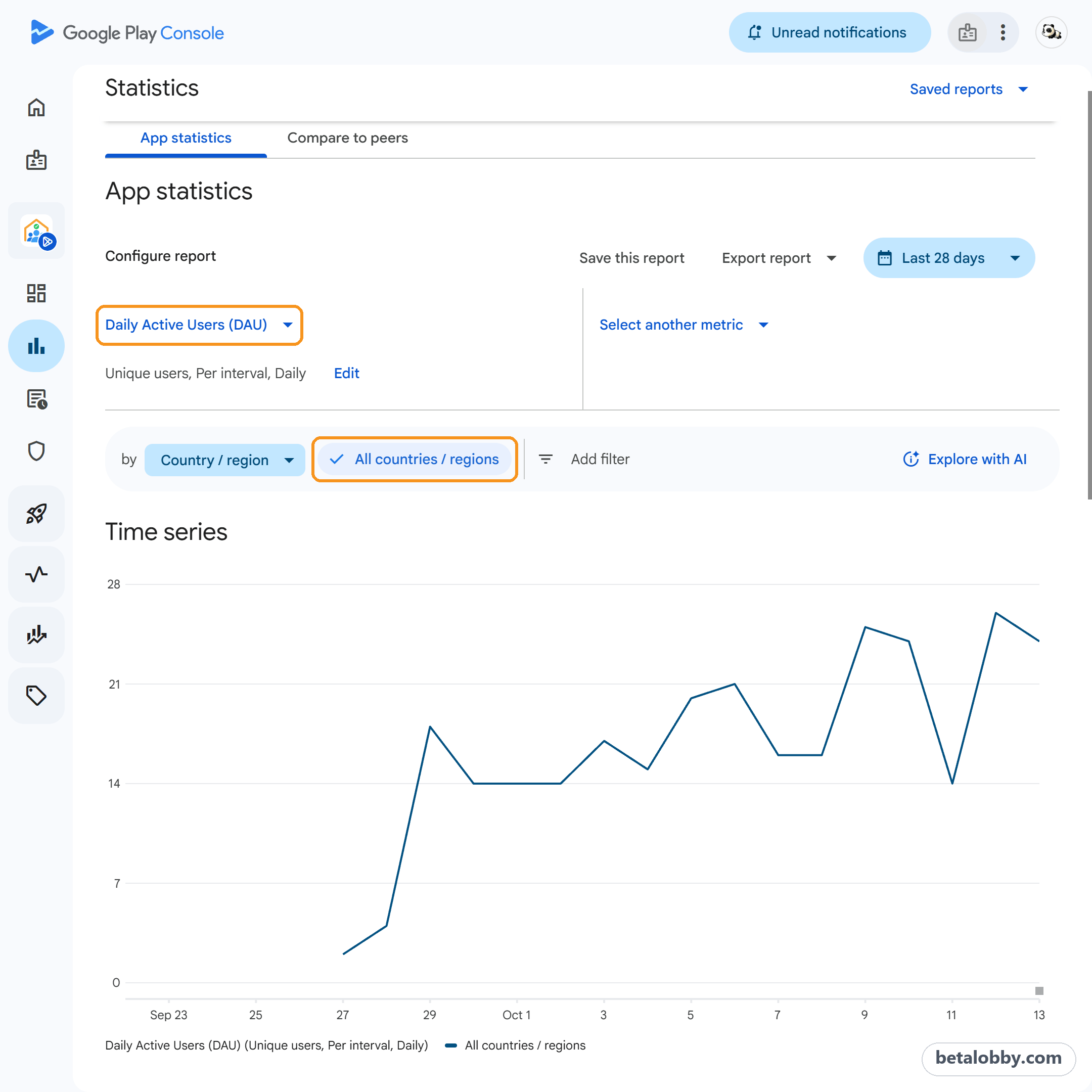
The country filter you set earlier stays on, so again read the All countries / regions line. If the chart is empty, don't panic. DAU lags even more than installed audience, often by several days.
How much DAU do you need? Around 12 a day is ideal, but don't obsess over the exact number. What matters is that the line has data every day. If it stays close to zero for the whole test, your testers aren't really opening your app, and the risk of rejection goes up a lot.
So when you recruit testers, be clear: installing isn't enough, they need to open the app every day for 14 days.
3App quality, and whether you shipped updates during the test
Almost every first-time developer misses this. Many think closed testing is about finding testers. The real focus is the app itself. Getting 12 testers only meets the baseline. Whether you get production access has a lot to do with your app's quality and how you iterate during the test.
App quality. There's no strict bar, but at minimum:
- Your privacy policy and the App content declarations in Play Console are filled in correctly
- The app is complete, not a single-screen shell
- Use Android's official app quality guidelines as a reference
Updates during the test. The second reason in the email, "you didn't follow testing best practices, which may include gathering and acting on user feedback through updates to your app", is about this.
The 12 testers / 14 days rule exists so developers polish their apps before going public, instead of flooding the store with low-quality apps. If you're building your app seriously, you'll find more to fix during closed testing than you expect. So ship new versions during the test, whether or not testers sent feedback.
There's no official number. From my experience: release at least 3 versions with real changes in each round of testing, and write down what each one changed. You'll need it for the questions.
4The application questions: where you show you're serious
This matters as much as anything above. If you rush through the questions, or reapply without changing a word of your old answers, you'll most likely get another rejection and another 14 days.
There's no model answer, and don't copy anyone else's. But a few things raise your chances a lot:
- Be completely honest. The first question asks whether you used a paid testing provider. That answer, the changes you made, your intended audience: nothing made up, nothing exaggerated.
- Use the space. Each text box allows up to 300 characters. If you tested properly, filling it is easy. I'd aim for at least about 260 characters per answer.
- Keep the grammar clean. If you're unsure, let AI check your grammar, but don't let it write your answers from scratch. It easily invents facts, which breaks the first rule.
- Update for this round. When you reapply, the boxes are pre-filled with your previous answers. Don't just click Next. Go through each one and change whatever is different this time. You'll also get an extra question about what you changed since your last application: new recruiting channels, the updates you shipped.
To prepare ahead, try our free production access questionnaire: all 9 questions word for word as in Play Console, with the same 300-character count, and drafts that stay in your own browser.
5Are your testers real?
This is the most complicated one and the hardest to pin down. Google doesn't say how it decides who is a "real tester", but any of these may land you here:
- Too few installed users, or almost no DAU
- Testers installing and opening your app on emulators
- Dozens of accounts all on the exact same device model
If you used a paid testing service, had enough testers, and were still rejected, ask whether that usage would look like real use from Google's side.
Checklist before you reapply
Before the next 14 days, check each one:
- Installed audience in Statistics is 12 or more
- Daily Active Users (DAU) has data every day
- You shipped at least 3 versions with real changes during the test and noted what each changed
- Your privacy policy and App content declarations are correct, and the app is complete
- Every answer is honest, uses the space, and was updated for this application
- Your testers are real people on real devices
Final thoughts
A rejection doesn't mean your app is bad. Most of the time, the test just didn't show Google enough real use and iteration.
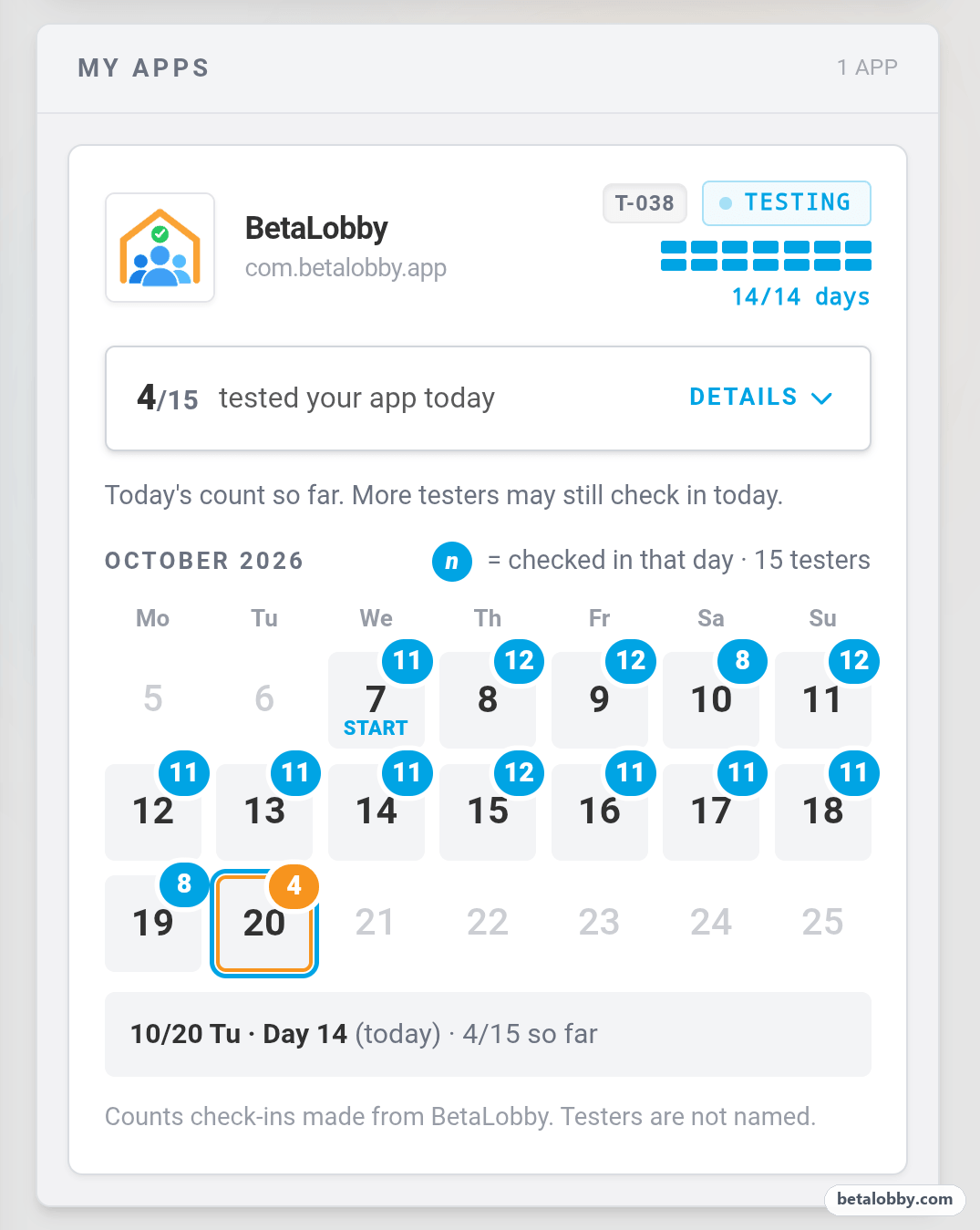
I learned all this the hard way, one rejection at a time. It's also why I built BetaLobby, a platform where developers help each other through closed testing. 16 developers form a team and install each other's apps, so everyone gets 15 testers at once. Your testers are developers in the same spot as you, who also need to pass closed testing. Each daily check-in really opens your app, and you can see in the app how many testers checked in each day. Emulators can't join teams, pair, or check in. It's completely free, with no paid testing of any kind.
Whether you get production access is still up to Google, and no platform can guarantee it. But real testers, real daily use, and real iteration during the test are the parts you can control.