 BetaLobby
To publish to production, a new personal developer account has this task on the Play Console dashboard: Run your closed test with at least 12 testers, for at least 14 days.
It looks simple, and the countdown moves forward by itself, so many developers assume they just have to wait 14 days. But what Google means by "continuously" is much stricter than that countdown.
Do all 12 testers have to start on the same day? What if someone opts out halfway? Do testers have to open the app every day? You'll find different answers online, and some of them contradict each other. This post goes through Google's own wording, point by point.
1What Google actually says
Start with the original wording. Hover over that task on the dashboard and a tooltip spells it out:
When you apply for production access, at least 12 testers must be opted-in to your closed test. They must have been opted-in for the last 14 days continuously
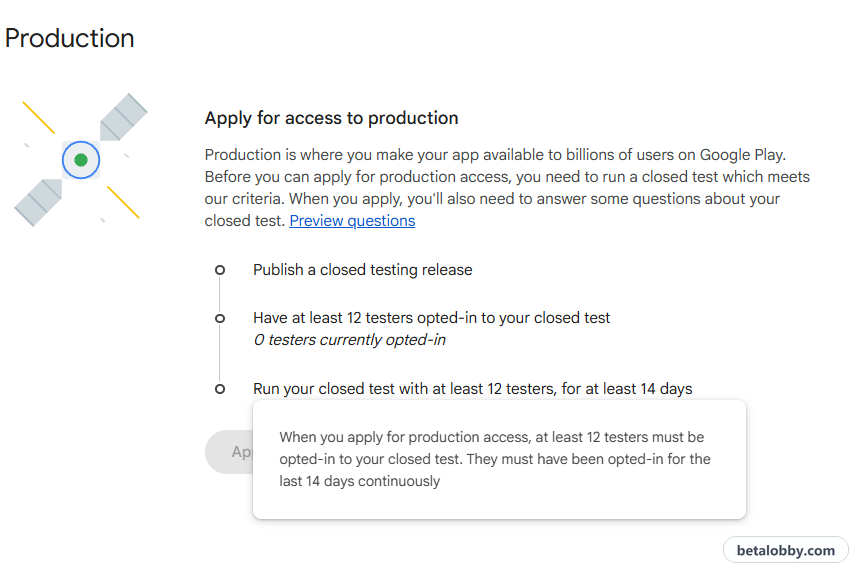
Play Console Help goes into more detail in App testing requirements for new personal developer accounts, and the sections below quote it line by line.
Put together, it comes down to 3 key phrases:
- When you apply: the requirement is checked at the moment you click "Apply for production"
- The last 14 days: counted backward from the day you apply
- Opted in continuously: those 12 people have to stay opted in for the whole 14 days
2Do all 12 testers have to start on the same day?
No. Google doesn't require everyone to join on the same day. The countdown starts on the day the 12th tester opts in.
For example:
- Day 1: 10 people opt in
- Day 3: the 11th person joins
- Day 5: the 12th person joins
The 14-day countdown starts on day 5, so the earliest you can apply is day 19. The first 4 days with 10 people don't get you there any sooner.
So the slower you gather testers, the longer you wait. It's best to get everyone together first and start at the same time.
3The countdown doesn't stop, but "continuously" can still break
On the surface: the 14 days never seem to break
As covered in Google Play closed testing: 5 things new developers get wrong, the 14-day countdown on the dashboard works like this:
- It starts once the 12th account opts in, whether or not anyone installs or opens the app
- Once it starts, it doesn't stop on its own, even if some testers opt out
If you only look at the dashboard, the 14 days almost never break. You just wait and they run out.
In reality: these 5 things break "continuously"
The countdown is just a timer. It doesn't check whether your testing was really continuous. Of the 5 cases below, the first two are about the rules; the other three don't show up in the count at all, but they do show up in review.
① A tester opts out
This is the one Google states most clearly:
Testers who opt in, test for fewer than 14 days, and then opt out do not count toward the requirement.
If a tester opts out and opts back in later, the 14 days must be consecutive to count toward the minimum requirement of 12 continuous opted-in testers.
So if someone opts out halfway, the countdown keeps running, but that person no longer counts toward "12 continuous testers". If you have exactly 12, losing one means you no longer meet the requirement. That's why you should always stay above 12 and keep some margin.
② Your application is rejected
In our own experience, when an application for production access is rejected with "More testing required", the countdown restarts on the day of the rejection. The 14 days you already ran don't carry over to the next round.
③ Opted in, but never installed
A tester opens your opt-in link and taps Become a tester, and your opted-in count goes up by 1. But they may never install your app.
The count doesn't break at all, but your installed audience is 0. In review, that looks like nobody tested.
④ Uninstalled halfway
Uninstalling the app is not opting out. A tester who uninstalls your app is still opted in, so your opted-in count doesn't drop and the countdown isn't affected.
But installed audience in Play Console drops, and the statistics show clearly that testing stopped partway.
⑤ Installed, but never opened
The app stays installed, but nobody opens it. If Daily Active Users (DAU) stays close to 0 for a long time, your testers aren't really testing.
Google lists this explicitly as a reason for more testing:
Reasons for required continued testing include having fewer than 12 opted-in testers or insufficient tester engagement during the testing period.
Summary
| Case | Countdown | Counts as a tester | In review |
|---|---|---|---|
| ① Opts out | Keeps running | No | You may fall below 12 |
| ② Application rejected | Restarts | — | Another round of testing |
| ③ Opted in, never installed | Keeps running | Yes | Low installed audience |
| ④ Uninstalled halfway | Keeps running | Yes | Installed audience drops |
| ⑤ Installed, never opened | Keeps running | Yes | DAU near 0 |
Only case ② restarts the countdown. In the other 4, it keeps running as usual. But Google can see all 5 when it reviews your application.
To find installed audience and DAU in Play Console, see the first two sections of "More testing required" on Google Play: 5 reasons and fixes, with screenshots and steps.
4So do testers have to open the app every day?
Google doesn't say testers must open the app every day, and it doesn't set a number of minutes. Missing a day or two won't restart the countdown.
But when you apply for production access, the questions ask about tester engagement, for example:
Whether testers used all available app features
Whether tester usage matched expected production user behavior
You'll often see this claim online: "As long as testers don't opt out or uninstall, it doesn't matter whether they use the app." That's only half right. If testers don't opt out, they keep counting and the countdown can finish. But if the app just sits there and almost nobody opens it, you're likely to get "More testing required" in review.
A safer approach: you don't need every tester to open the app every single day, but across the 14 days your DAU line should always have data.
53 common myths
- "All 12 testers must install on the same day." No. The countdown starts on the day the 12th tester opts in. See section 2.
- "Once the countdown finishes, you've tested for 14 continuous days." The countdown doesn't stop when testers opt out, never install, uninstall, or never open the app, but all of these break the real "continuously". See section 3.
- "Miss opening the app one day and the 14 days start over." No. What restarts the countdown is a rejected application, not a missed day. See section 4.
6How to get through the 14 days safely
Put the sections above together and it comes down to a few things:
- Gather everyone first, start together: don't make the early testers wait for nothing
- Keep a margin: have a few more than 12, so one person opting out isn't a problem
- No opting out, no uninstalling: tell testers up front not to opt out or uninstall the app during the 14 days. Google makes the same point in its help page: "Inform your testers that they need to remain opted in to your closed test continuously for at least 14 days."
- Use the app naturally every day: no need to pad screen time, but keep your DAU line from going empty
BetaLobby is a platform where developers help each other through closed testing, built around exactly these points:
- Teams of 16: each app gets 15 testers, a margin above 12
- Everyone starts together: once all members have installed their teammates' apps, the 14 days start at the same time
- Daily check-ins: each check-in really opens your app, and you can see in the app how many testers checked in each day
- 4 hearts of slack: missing a day or two doesn't break Google's rules, but not using the app for a long time hurts in review. So everyone has 4 hearts, and TRUST is only deducted after missing more than 4 days in the 14
In the end, the "continuously" Google wants isn't a dashboard countdown that reaches 14 days. It's 12 or more people really using your app throughout those 14 days.